



Collect and Display Reviews Effectively to Sell More
Learn best practices for collecting and displaying customer reviews to enhance your shop's visibility, boost conversions, and build trust with shoppers.
If you already have a collection of customer reviews, you might be wondering if you can transfer them to your new reviews platform. Why start from scratch when you can simply import them? With Trusted Shops, it's possible! How does this work? What are the requirements? What do they look like on your Trusted Shops profile? Get all your answers in this article.
Table of Contents:
Tip: This article is intended to give you an idea of how importing reviews works. For a step-by-step guide, be sure to check out our Help Centre article: How can I import reviews I have collected from other providers into eTrusted?
No, you don't need to import your customer reviews. In some cases, it may not even be possible. If you've already collected reviews from a provider and you meet the requirements, it might be wise to import them.
This way, you immediately get reviews on your company profile, so customers know that your online shop is reliable from the start.
At Trusted Shops, you can import two types of reviews for your online shop if you’ve already collected them from another provider:
Service reviews (aka shop reviews, store reviews)
Product reviews
You can decide whether to import both, just one, or neither.
Additionally, you can also import the replies you’ve given to those reviews.
For service reviews, it's important that your reviews were collected through a certified Google seller ratings partner. Note: You can't import reviews collected directly through Google, such as those for your Google Business Profile.
Click here to view the full list of certified Google partners.
Tip: It may still be possible to import service reviews that you’ve collected through a provider that is not a Google partner. Contact our experts and ask about the options.
If you want to import product reviews, they must come from a Google partner or be collected through your own shop system.
Further requirements:
The reviews must be linked to an actual order.
Reviews must come from real customers.
The review scores and texts may not have been modified by you.
You may not select or omit reviews.
You must have the right to use the reviews and the right to grant Trusted Shops the necessary sublicense.
You can read further requirements in this section of our Help Centre article: What prerequisites do I have to meet to be able to import reviews?

The import itself consists of a few steps, but they are quite simple. The steps are summarised briefly here:
Check if you meet the requirements.
Email members@trustedshops.com to receive the necessary agreement. Read, print, sign, and scan it.
Download the sample import table file (for both product and service reviews).
Create a table with your existing reviews using the import table.
Please return your table(s) and the agreement to members@trustedshops.com.
To follow the steps in detail, read this section in our Help Centre article: What do I need to do if I want to import reviews?
In the import table, we ask for some information in order to display it correctly and to confirm that these are real reviews.

Shutterstock/Rawpixel.com
💡 Below is a summary of the information. For more information, see: What data do I have to enter in the import table?
The data we need for service assessments :
Language of the assessment
Rating score (on a scale of 1-5)
Date and time of assessment
Order number of the order associated with the review
This data is optional:
The channel we should send your reviews to
Title of the reviews
Text of the reviews
The order date of the order
The provider where you collected the review
If you have responded to a review, you can also enter your response and the date and time of your review.

For product reviews, we have the same required information as for service reviews, plus:
Name of the product being reviewed
URL of your product page
The SKU of the product (which you have in your shop system)
This data is optional:
Product image
Manufacturer Part Number (MPN)
Global Trade Item Number (GTIN)*
Brand of the product
*If you also use Google Integration for Google Ads, please also provide the GTIN.

Reviews that are no older than 12 months are visible on your review profile, along with reviews you've collected through Trusted Shops. You'll see the word "Imported" on them:
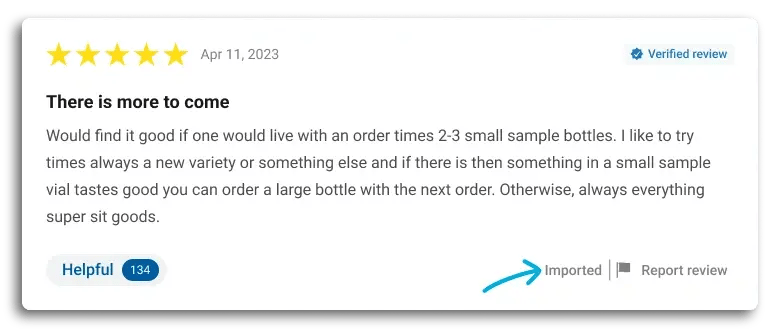
Reviews older than 12 months will not be shown in the review profile.
These imported reviews are not factored into your average rating (as seen at the top of your company profile and in the Trustbadge®), but they are counted in the “total reviews collected” numbers seen in both the Trustbadge and your reviews profile.
However, it's a good idea to display the recent reviews and import all reviews, so shoppers can see that you've been serious about reviews for a long time and have therefore already collected many.
If you implement a widget on your website, these reviews can be found there despite them not impacting your average rating score.
Recommended reading:
How to Display Reviews in Your Online Shop with Widgets
Want to learn more about collecting and/or importing customer reviews with Trusted Shops? Feel free to contact our experts:

This article was translated and adapted from our Dutch blog: Importeer je bestaande reviews naar Trusted Shops
24/02/26



After studying marketing & communication (Aventus, Apeldoorn) and journalism (Windesheim, Zwolle), Daniëlle worked for several years in Portugal in customer service for large online shops. Since 2019, she has been working at Trusted Shops as Content Manager Benelux, focusing on the Dutch-speaking market.
Read more