



Collect and Display Reviews Effectively to Sell More
Learn best practices for collecting and displaying customer reviews to enhance your shop's visibility, boost conversions, and build trust with shoppers.
Google Ads are a great way to increase visibility for your online shop in the search results. If you’re paying for the privilege of the first position, you’ll want to increase the odds of users actually clicking on your ad. One of the best ways to improve your click-through rate is by displaying star ratings in those ads.
To be clear, this article will focus on store ratings (aka shop ratings, seller ratings). Product ratings also appear in Google search results. However, if Google determines that a user is looking for a product, it will often display Google Shopping listings in the results.
For more information on star ratings in Google Shopping Ads, you can read our article on creating the perfect Google Shopping Ads.
Table of Contents:
For a full overview on getting your star ratings across the Google ecosystem, download our free whitepaper:
Without further ado, let’s have a look at getting your store ratings into Google Ads.
Google will often display your store rating (1-5) in the form of stars under your Google Ad. Along with the rating, there will also be a number displaying how many reviews the rating is based on.
Users can see that it is an ad as all Google Ads are accompanied by a “Sponsored” label above it.
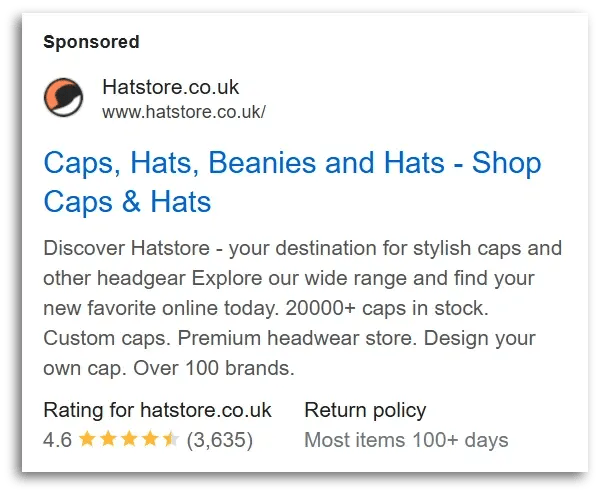
Source: Hatstore.co.uk
Note: Stars may appear in organic search results as well, but Google usually limits organic store ratings to third-party review sites. To read more about displaying stars in organic results, read our article: Display Star Ratings in Google Organic Search Results
We touched on this already, but store ratings can increase the click-through rate (CTR) of your Google Ads. Star ratings build trust for your brand and this leads to less hesitation for first-time visitors.
When your Google Ads perform better, Google rewards you with a lower cost-per-click (CPC). Google likes it when users click on ads since they get paid for every user click. It’s a win-win-win situation:
Google inspires more clicks and gets paid.
Users get a good experience and find the product they're looking for.
Shops drive more traffic to their site and sell more products.
Recommended reading:
Trust Marketing: Building Confidence With Your Target Audience
Store ratings in Google Ads are considered extensions (aka assets), which means they are additional elements from the core structure of an ad.
Some extensions are automatic and others can be added manually. In this case, store ratings are automated assets. As long as you have a qualifying rating (more on that in the next section), they will automatically appear in your ads.
Store ratings are aggregate ratings from credible sources. Google collects these store ratings from its own platform (Google Customer Reviews) as well as approved third-party review platforms (e.g. Trusted Shops, Trustpilot).
Important: Collecting service reviews on your website is not enough. Google must be able to access these reviews somehow. That is why it is best to work with a supported review partners.
The Trusted Shops Reputation Manager lets you distribute customer review requests for open review platforms like Google and Trustpilot, helping you maintain a harmonious online reputation.

Let’s dive a bit deeper into the requirements for displaying your store rating in your Google Ads.
When we look at the basic requirements for your store rating, the reviews must:
Once the basic things match, there are a few additional things to keep in mind:
With the Trusted Shops Google Integration, you can be sure that Google is always up to date with your latest ratings.

Although there is no guaranteed way to ensure your store ratings appear in your Google Ads, there are some things you should be doing.

Source: Suri_Studio
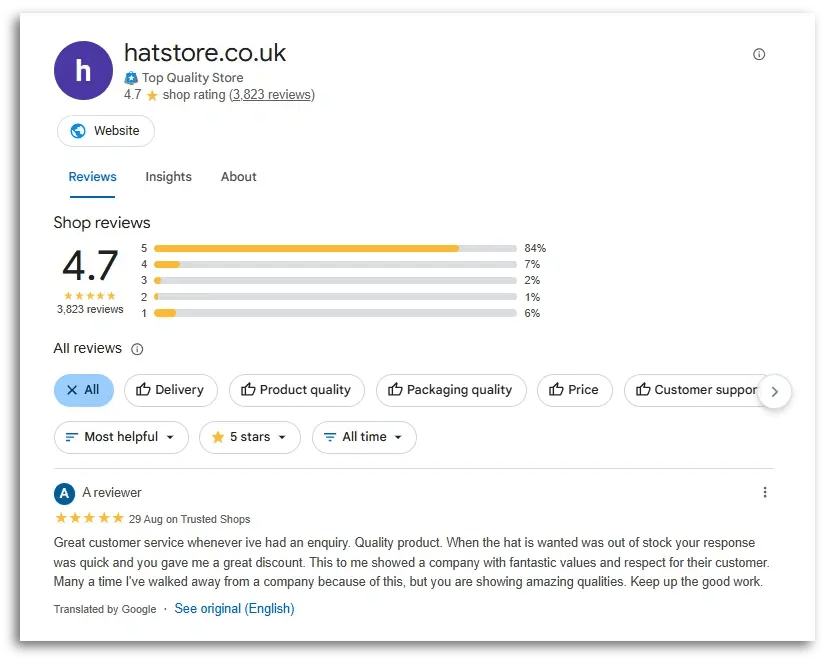
You can check what your review status looks like in Google. Simply enter your website into the last section of the link below – replace “{yourwebsite}” with your domain.
https://www.google.com/shopping/ratings/account/lookup?q={yourwebsite}
In this example, we entered:
https://www.google.com/shopping/ratings/account/lookup?q=hatstore.co.uk
How can you collect more reviews? Ensure a steady stream of customer reviews by having a review request system in place. Emails should be sent to your customers automatically a few days after they’ve received the product.
The more customers you ask, the higher your rating will be. The logic goes that unsolicited reviews tend to skew negatively because unhappy customers tend to be more motivated to leave reviews unprompted. So, if you want a higher rating and more positive reviews, you have to proactively ask your customers.
Product reviews are important too. As we mentioned at the beginning of the article, they are very visible in Google Shopping Ads, which is an important platform for online shops. Besides that, product reviews are also relevant for successful product pages.
Recommended reading:
5 Tips for Google Shopping Free Listings
If you’ve collected enough reviews and are still unsatisfied with your rating, it’s time to boost your ranking the old-fashioned way: improve your services.
Keep an eye on your reviews, read them, and figure out where there is room for improvement. For example:
Displaying your store rating in your Google Ads can be a great way to boost the performance of your ad campaigns. Paying for your website to be in the first position can be worth the cost per click, but you can take things to the next level by adding eye-catching, trust-building star ratings to your ad as well.