
Collect and Display Reviews Effectively to Sell More
Learn best practices for collecting and displaying customer reviews to enhance your shop's visibility, boost conversions, and build trust with shoppers.
Trusted Shops offers numerous dashboards and analytics tools to simplify the work of online retailers. What are they, and how can you use them to maximise your performance? In this article, we'll examine these dashboards and give you insights into what information you’ll find there.
Table of contents:
Trusted Shops' dashboards and analytics go beyond simply tracking how many reviews you've received and what your average rating is. These tools help you discover what's working well in your online store, what you can improve to increase customer satisfaction, and compare your online store with others in your industry to see how you're doing.
These tools are there to help you understand what your customers think of you and how you’re benefiting from the trust solutions we provide.
Do you want to know how well AI can find your online shop and where you can still improve? Take the free AI Trust Audit from Trusted Shops (also available to non-member shops).
Just enter your URL, and within seconds, the tool performs an audit, checking dozens of points to see how well you're performing. It checks elements such as crawling & indexing, authority & structure, and security & technology.
If you complete the form on the results page, you'll also receive a free, more detailed report that you can download as a PDF. This downloadable PDF also details the data found for each point and offers tips on how to improve.
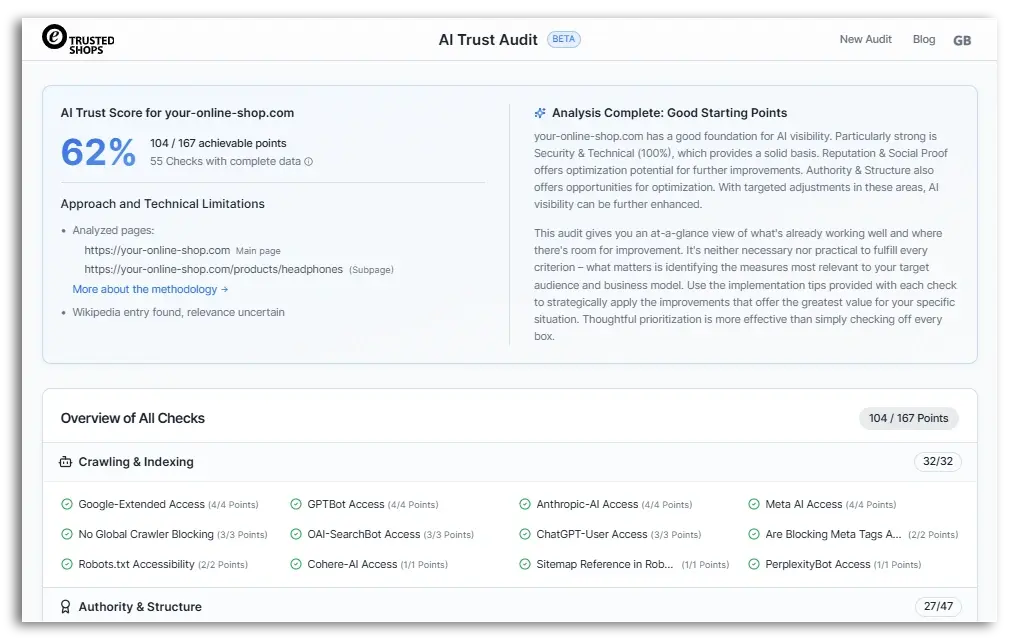
Click on the image to enlarge it.
Check out the AI Trust Audit landing page by clicking on the banner below:

When you become a Trusted Shops member shop, you’re joining the Community of Trust.
So, what's the added value of the Community of Trust for your online shop? This dashboard shows the key figures and is available to member shops that qualify for the Trustmark and thus, offer the Buyer Protection.
Recommended reading:
The Trusted Shops Trustmark: How the Certification Process Works
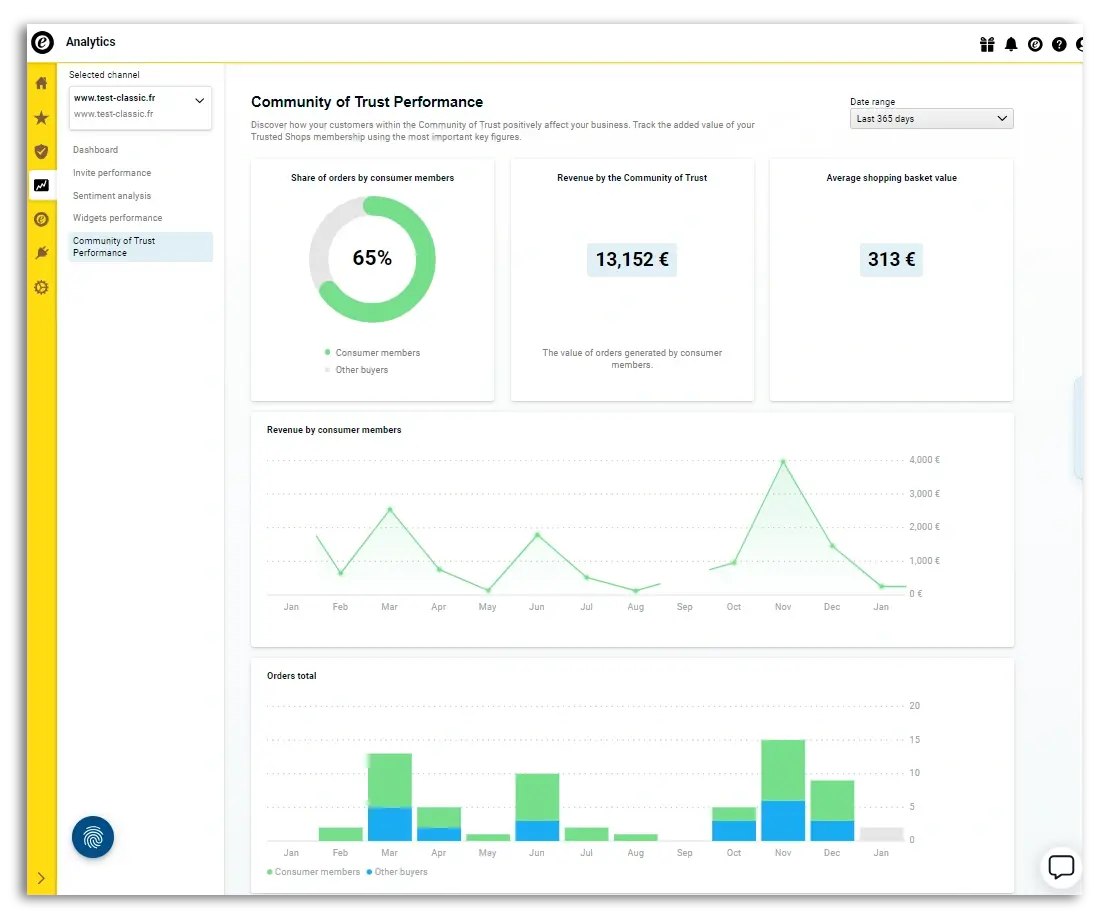
The Community of Trust dashboard shows you what percentage of your customers are Trusted Shops consumer members and how much revenue they've generated for your shop. You'll also see the average order value of Trusted Shops members in your online store.
Shoppers in the Netherlands, Germany, and Austria can purchase a paid PLUS membership, which all but guarantees an even higher order value when they shop with you. This dashboard displays the average order value for Basic members and PLUS members separately.
You can see what percentage of your shoppers are Trusted Shops consumer members. You'll also see a graph showing how much revenue you’ve earned from those consumer members over the last year.
You’ll also be able to compare the total number of orders between consumer members and “other buyers” over the past year.
This overview shows you how many customers benefit from the security of the Buyer Protection and what your average order value is, thanks to this security. Compare this with the average order value for your entire online store to see how trust translates into increased revenue.
Click on the image to enlarge it.
Learn more in our Help Centre article:
How can the Community of Trust affect my business?
Recommended reading:
What is the Trusted Shops Community of Trust?
The general dashboard is included with all paid Trusted Shops memberships. If you want to know how your review score is structured, how it's evolved, and how you're doing compared to previous periods, this dashboard will help you.
Shutterstock/BestForBest
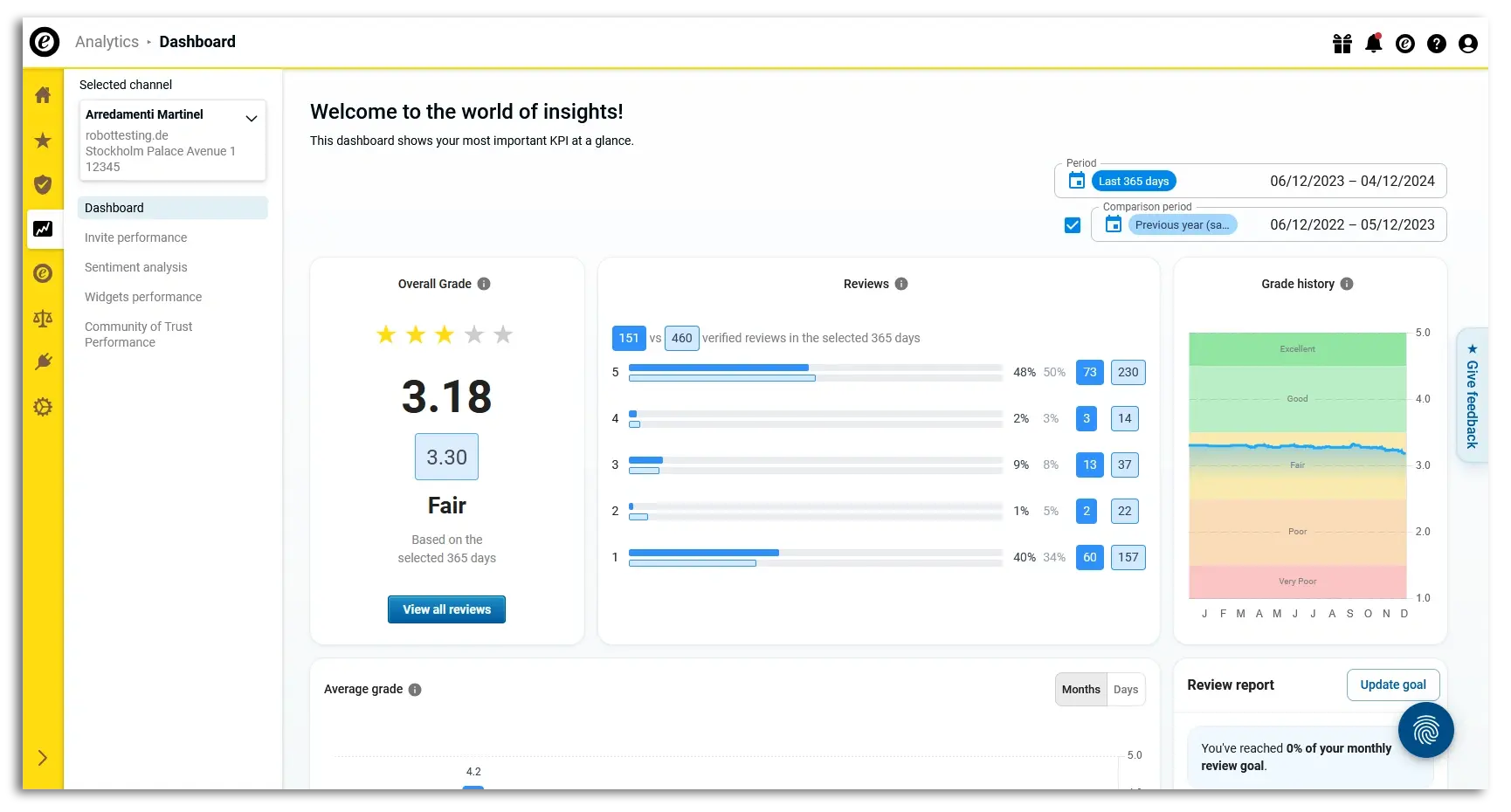
You can choose a period of time to analyse as well as a comparison period, so you can easily see whether you are doing better than before.
Here, you can see your total score from the last 365 days, the number of reviews you’ve collected, and how many 1-, 2-, 3-, 4-, or 5-star reviews you've received (and the percentages of the total). You will also see a rating history, where you can see in which months your rating has gone up.
Note: The letters below represent the months. The one you see first depends on the period you’ve selected. Therefore, you might see March first, not January.
As you scroll down, you'll see the average score, which you can view monthly or daily. You might consistently have a lower score in December, for example, due to the stress of the holidays. This tells you that you might need to focus more on customer satisfaction next December to maintain a high rating.
You can also download this overview as an XLSX or PNG file.
Click on the image to enlarge it.
Learn more in our Help Centre article:
How can I analyse the development of my collected reviews?
The dashboard to check how your review requests perform is included with all paid Trusted Shops memberships. If you want to know how many review requests you’ve sent and how many have been completed, this is the overview for you.
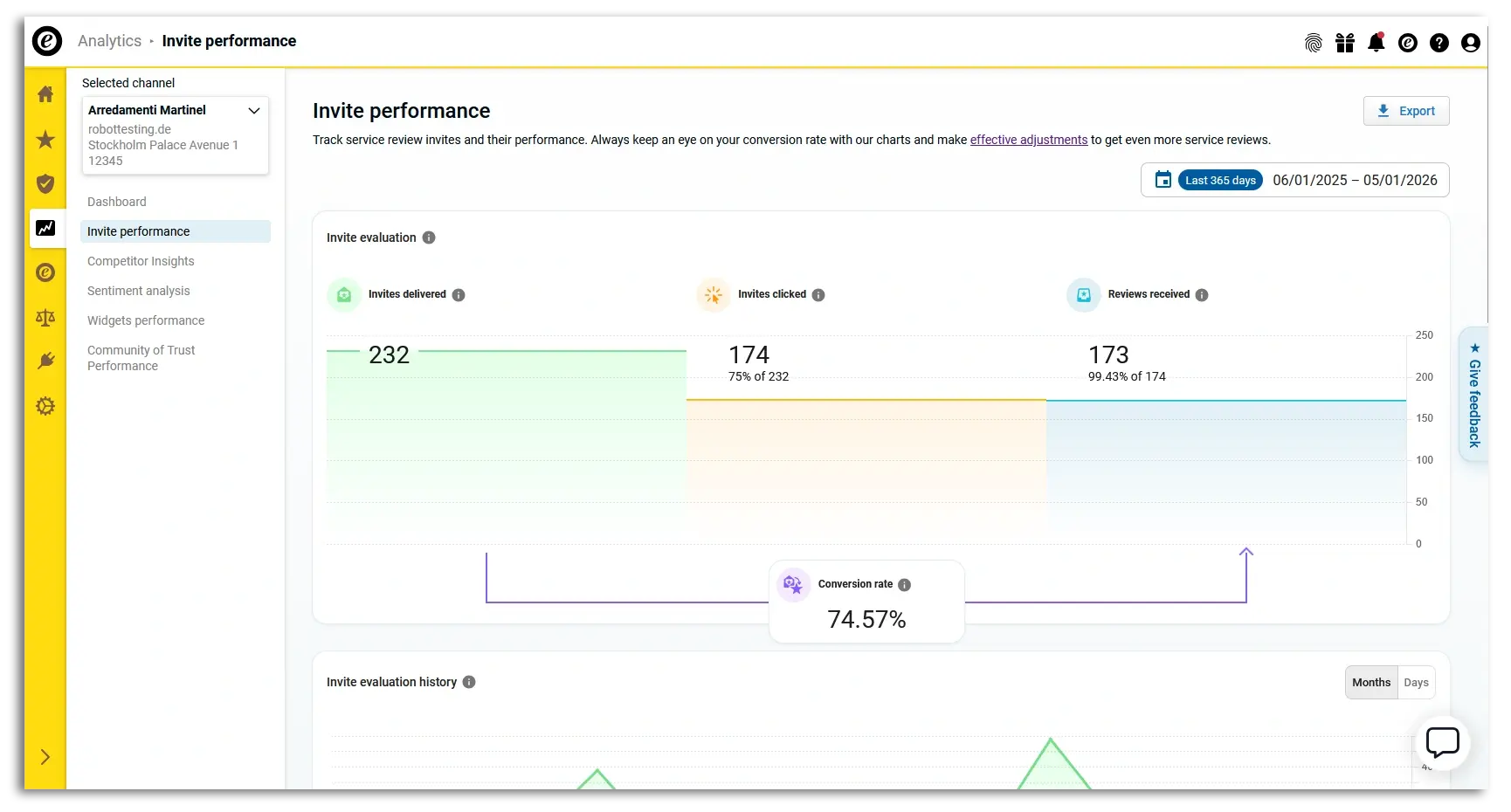
You can specify a time period to view, and you'll see how many review requests were sent, how often customers clicked on the request, and how many left a review. This information is displayed in both exact numbers and conversion rates.
You can also see the history of the above KPIs in a handy graph, as well as the conversion history.
You can also download this overview as an XLSX or PNG file.
Click on the image to enlarge it.
Learn more in our Help Centre article:
How do I track the performance of the review invites I’ve sent out?

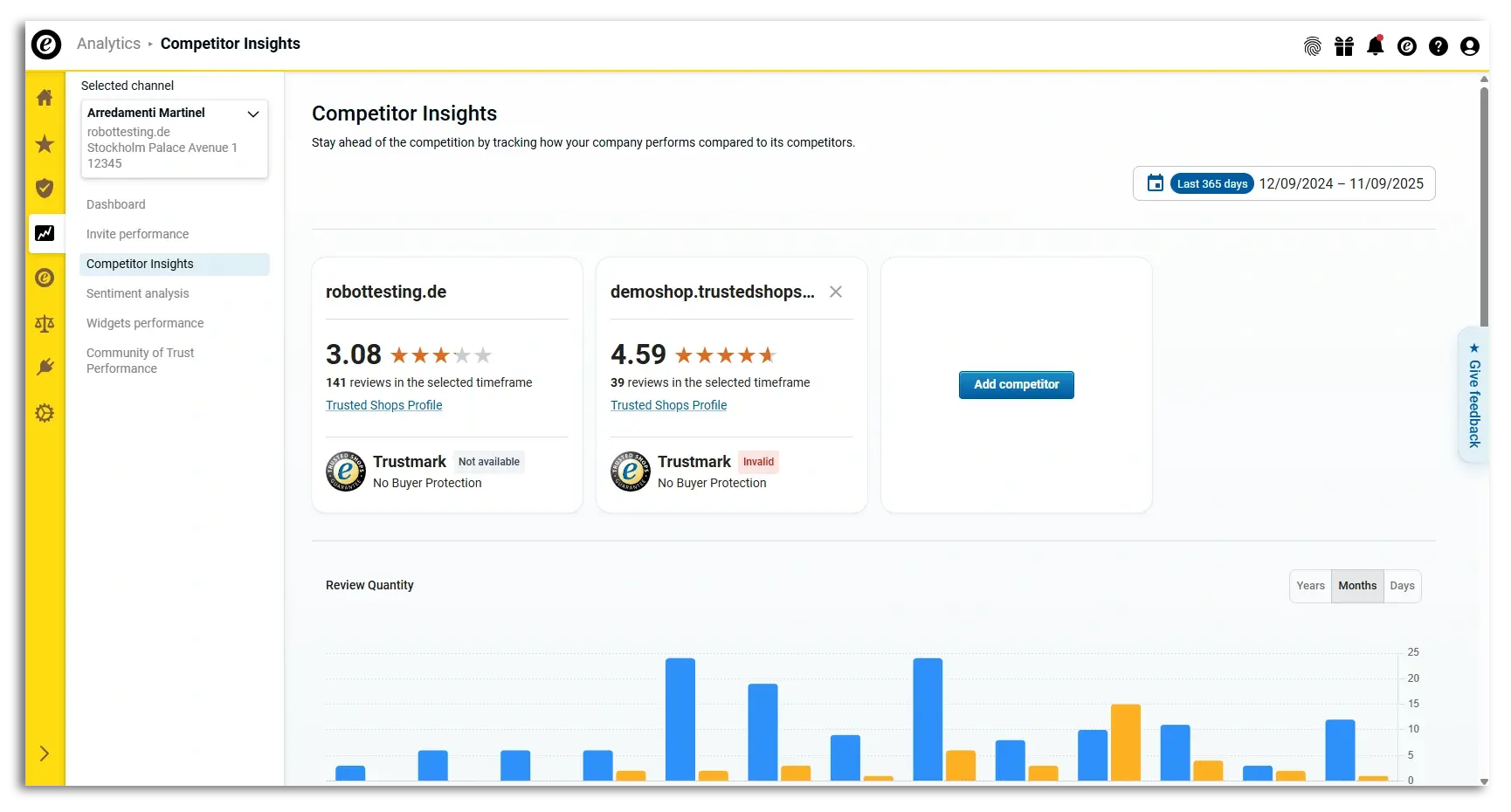
How does your online store compare to your competitors? This relatively new tool provides the answer. The Competitor Insights dashboard is included with all paid Trusted Shops memberships.
In this analysis, you can add the competitors you'd like to compare your shop to. Once chosen, you'll see their Trusted Shops rating, how many reviews they've received, and whether they have a Trustmark with Buyer Protection.
You can also see how many reviews you’ve all received over a period of years, months, or days. You can compare who received the most 1-, 2-, 3-, 4-, or 5-star reviews. Perhaps your average rating is higher, but do they receive more 5-star reviews?
Check out their business profile and read their reviews. Why are their customers satisfied? Sometimes it's better to emulate something proven to be successful instead of reinventing the wheel.
You can also download this overview as an XLSX or PNG file.
Click on the image to enlarge it.
Learn more in our Help Centre article:
How does my company compare to the competition?
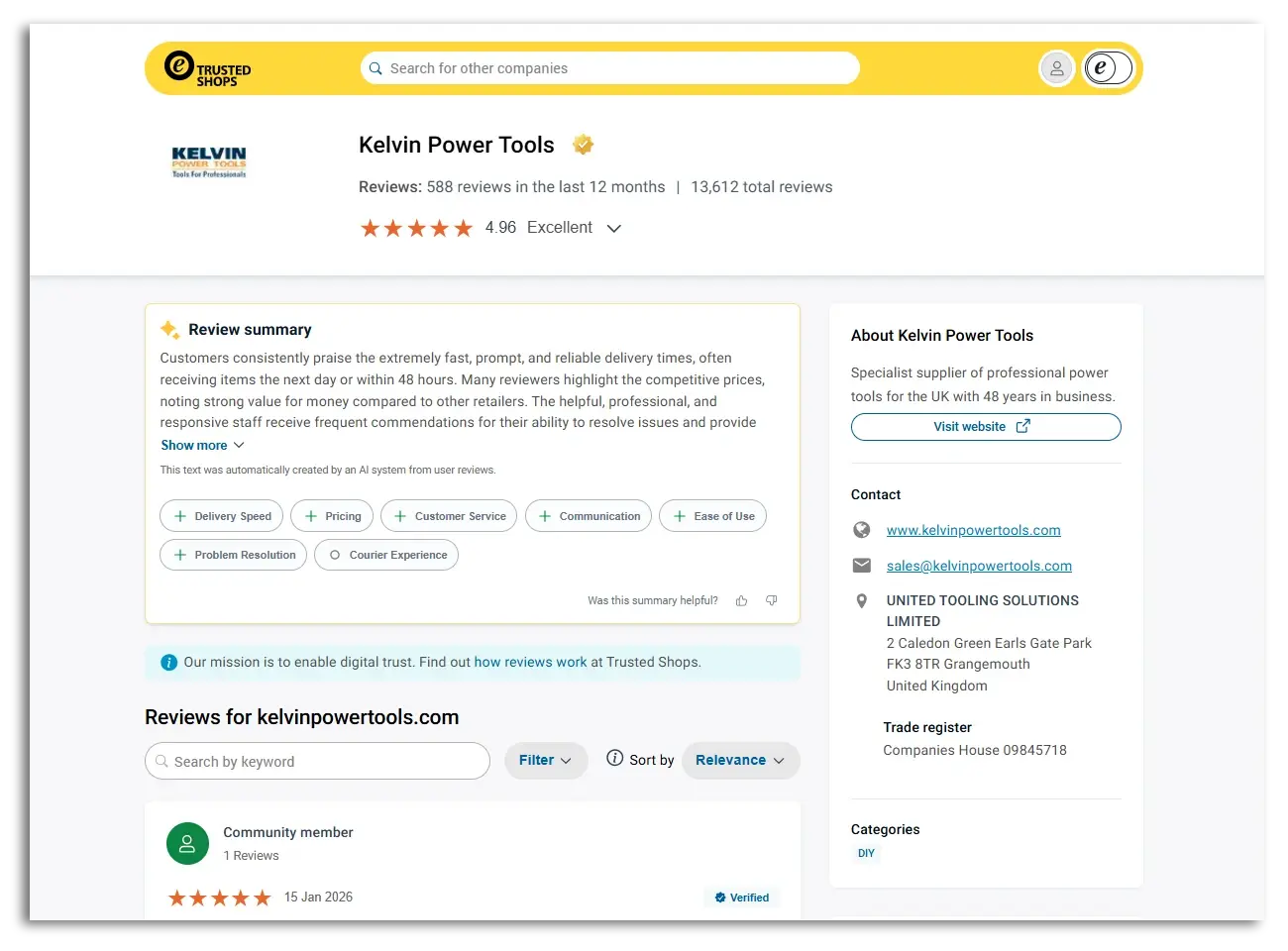
Want a quick summary of what's generally being said about your online store in your service reviews? Then check out your company profile (aka review profile). The Trusted Shops company profile is available for all business profiles, including free customers and unclaimed profiles. They can be found easily in Google’s search results.
AI summarises your reviews into a short text, allowing you (and shoppers) to quickly understand what previous customers are saying about you. You'll also see various keywords listed below the summary, with a green “+” sign for positive reviews, a grey “-” sign for improvements, as well as an “O” for more neutral feedback.
Tip: Click on any of these keywords. A summary will open with a little more information and the specific reviews written about it.
Also, be sure to look at the details if there is a green plus sign in front of it, too. Sometimes, they are generally very positive, but still have useful feedback for you to learn from.
Want more detailed information? We recommend the Sentiment Analysis (next section).
Click on the image to enlarge it.
(Source: Kelvin Power Tools)
Learn more in our Help Centre article:
What is the company profile?
If your review profile exists, you can search for it on our Shop search. Simply search for your shop name at the top, and if it exists, it will appear in the results.

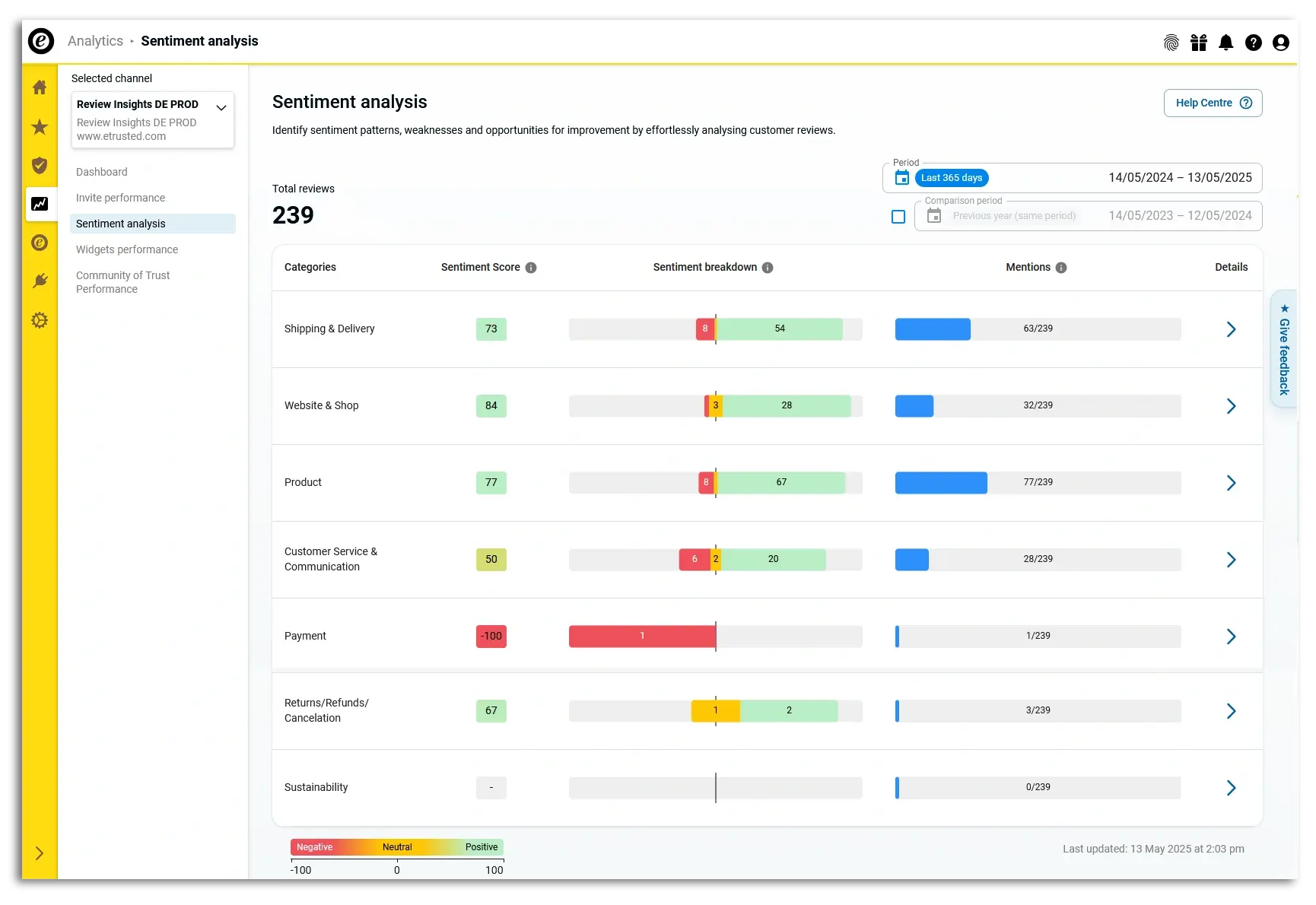
What do customers like about your online shop? Where are your opportunities for growth? You can book the Sentiment Analysis to answer these questions.
This AI tool analyses your reviews over the period you specify. You can also choose a comparison period.
The analysis shows you various categories important to your online shop, such as:
Next to each category, you’ll see:
This analysis will help you prioritise the elements of your shop that you want to optimise. For example, you might have a -100 Sentiment Score for Payment, but if only one customer talked about it, then you might decide to focus on Customer Service & Communication, which has six reviews with negative mentions.
Clicking on any particular category will take you to your inbox, where you'll find reviews discussing this topic. You can also respond directly to the reviews there.
Click on the image to enlarge it.
Learn more in our Help Centre article:
How do I analyse my review comments?
Want to learn more about the Sentiment Analysis? Click below:

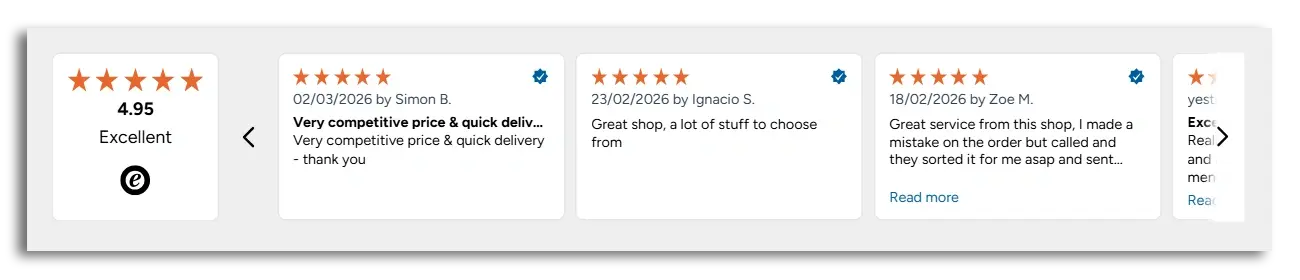
The Widgets dashboard is for paying Trusted Shops customers who have added widgets to their online shop. For example, you could add a reviews carousel widget to your homepage:
Source: Snowlab
With the dashboard, you can see how those widgets have been performing over the past 7, 30, or 365 days.
First, you’re provided with an overview of your existing widgets and when they were created. The identification number also makes it easier to find the widget on your site, and the preview shows you what the widget looks like.
A graph shows how many unique impressions there are for that widget during the specified period. A unique impression is defined as when the widget appears on your visitor's screen.
Are you getting a lot of page views but very few unique impressions on the widget? Then your widget might be positioned too low on the page, preventing visitors from scrolling down far enough to read. Improve your ability to build trust with new visitors by moving the widget higher on the page.
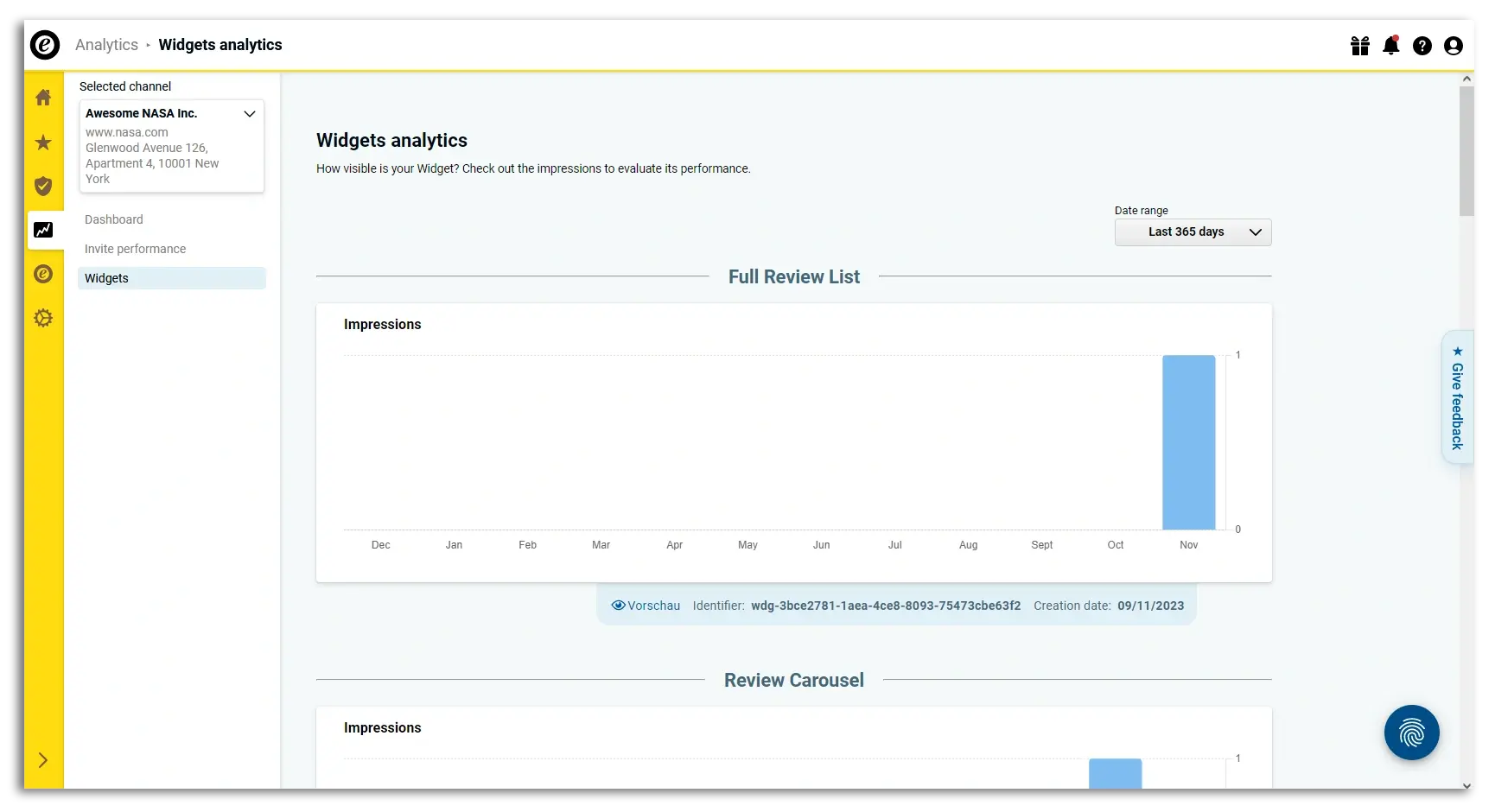
Click on the image to enlarge it.
Learn more in our Help Centre article:
How do I find out how often my widgets are displayed?
Recommended reading:
How to Display Reviews in Your Online Shop with Widgets
Trusted Shops offers numerous dashboards that can help you improve the performance of your online shop and see the value of your Trusted Shops membership in terms of exact sales.
We continue expanding our dashboards and regularly develop new ones based on feedback from our customers.
Want to learn more about these dashboards and analytics or about Trusted Shops membership? Feel free to contact our experts:

This article was translated and adapted from our Dutch blog: Zo gebruik je Trusted Shops dashboards en analyses
17/03/26



After studying marketing & communication (Aventus, Apeldoorn) and journalism (Windesheim, Zwolle), Daniëlle worked for several years in Portugal in customer service for large online shops. Since 2019, she has been working at Trusted Shops as Content Manager Benelux, focusing on the Dutch-speaking market.
Read more